Responsive Website Development Explained (2026): Mobile-First Guide for Businesses
In 2026, a website is considered “professional” only if it works perfectly on mobile. Most visitors will open your website on a phone first—especially in India. If your website looks broken, text is hard to read, buttons are difficult to tap, or the layout feels messy, users leave within seconds. That single moment can cost you a lead, a customer, or even your brand trust.
That’s exactly why responsive website development matters. Responsive means your website automatically adapts to different screen sizes and devices:
- mobile phones (small + large)
- tablets
- laptops
- desktops
Responsive is not “extra design.” It’s the standard. A responsive website improves:
- user experience
- conversion rate (WhatsApp / form leads)
- SEO rankings (mobile-first evaluation)
- brand trust (premium feel)
This guide explains responsive website development in a simple, business-friendly way, including mobile-first strategy, breakpoints, layout rules, speed impact, and a practical checklist used by professional teams.

Quick Definition: What Is a Responsive Website?
A responsive website automatically adjusts these elements:
- Layout: 2–3 columns on desktop → stacked sections on mobile
- Typography: headings and text resize for readability
- Images: resize/crop properly, never overflow screen
- Navigation: desktop menu becomes a mobile-friendly menu
- Buttons: tap-friendly size with proper spacing
- Forms: easier to fill on phone (inputs optimized)
In short: one website, perfect experience on every screen.
Why Responsive Design Is Critical in 2026
1) Most traffic is mobile
For business websites, mobile is often 60–90% traffic. If your mobile experience is weak, you lose the majority of potential customers.
2) Google evaluates mobile first
Google’s evaluation heavily prioritizes mobile experience. A site that looks good only on desktop will struggle to rank well.
3) Conversions depend on usability
On mobile, your WhatsApp CTA, contact button, and form must be easy to use. If users struggle, they abandon.
If you want a fast, SEO-ready site or web app with premium responsive UX, see: Web Applications Services
Responsive vs Adaptive vs Mobile App (Simple Difference)
Responsive Website
One website that adapts fluidly across devices. Best for most businesses.
Adaptive Website
Multiple fixed layouts for specific screen widths. More maintenance, less flexible.
Mobile App
Separate app (Android/iOS). Not a replacement for a website. Most businesses should first build a responsive website.
The Professional Approach: Mobile-First Design
Modern teams build mobile-first. This means: 1) design for phone first 2) then expand for larger screens
Why mobile-first works:
- forces clarity (no clutter)
- improves speed
- increases conversion
- prevents broken layouts on small screens
A desktop-first approach often creates problems like:
- cramped content on mobile
- oversized images
- buttons too close
- text too small
Mobile-first avoids these problems from day one.
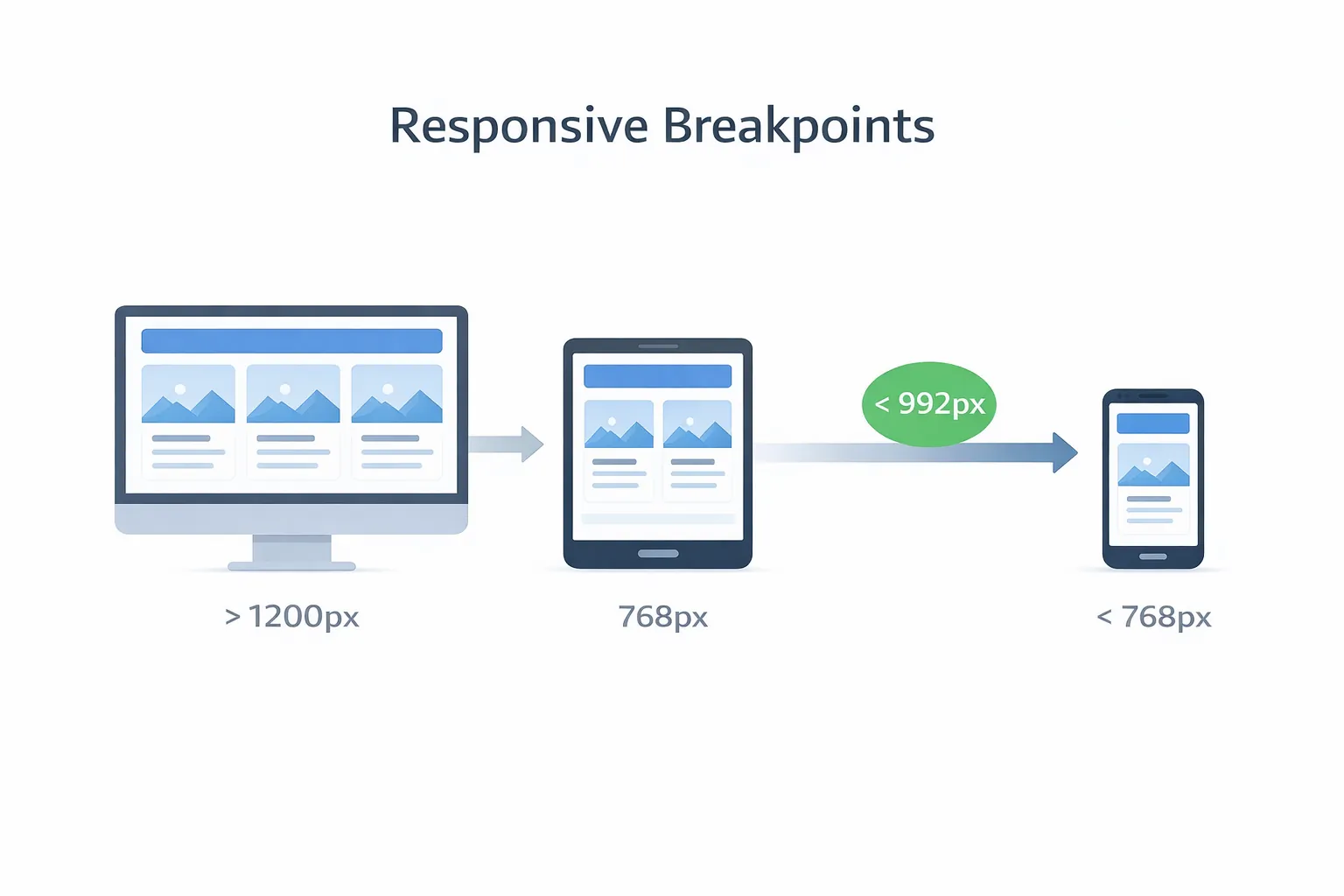
Breakpoints: The Core of Responsive Development
Breakpoints are screen-width points where layout changes. For example:
- on desktop, services might display in 3 columns
- on mobile, the same section becomes 1 column
Common breakpoint ranges (2026 standard)
- 320–480px: small phones
- 481–768px: large phones + small tablets
- 769–1024px: tablets + small laptops
- 1025–1440px: laptops + desktops
- 1441px+: large displays
Important note: You don’t need 20 breakpoints. You need clean layout rules that naturally adapt.
What Actually Changes When Screen Size Changes?
1) Layout: columns → stack
- 3 columns on desktop → 1 column on mobile
- side-by-side sections → stacked sections
- tables → cards or horizontal scroll
2) Typography: readable and consistent
- body text becomes comfortable to read (line-height matters)
- headings remain bold but not oversized
- avoid long lines of text on desktop (max-width helps)
3) Navigation: desktop menu → mobile menu
- hamburger menu on mobile
- sticky header height might reduce for mobile
- CTA button should still be accessible
4) Images: correct size + correct ratio
- images should never overflow
- images should not cause layout jumping
- use WebP for speed
5) Buttons: tap-friendly
- minimum tap target ~44px height
- enough spacing between buttons
- WhatsApp CTA must be easy to tap
Responsive Website Best Practices (Professional Standards)
1) Use a responsive grid system
Modern responsive sites use:
Avoid old fixed layouts.
2) Avoid fixed widths
Bad:
Good:
max-width: 1200px; width: 100%;
Fixed widths cause overflow on small screens.
3) Use scalable spacing and typography
Use consistent spacing scale:
- mobile: smaller spacing
- desktop: larger spacing
Use rem units so fonts scale cleanly.
4) Optimize images
Responsive images must be:
- WebP format
- compressed (fast load)
- lazy-loaded below the fold
- served in correct dimensions
5) Keep forms mobile-friendly
Forms fail most on mobile. Improve by:
- fewer fields
- large inputs
- clear labels
- proper keyboard types (numeric for phone)
Responsive + SEO: How Responsiveness Helps Ranking
Responsive design helps SEO because:
- you have one URL for all devices (no duplicate versions)
- Google crawls and indexes easily
- user engagement improves (lower bounce rate)
- mobile performance improves (rank boost)
A site can have great content but still struggle if mobile UX is poor.
Responsive + Speed: Why Performance Matters
Responsiveness is not only about layout. It also affects speed.
Mobile users often have:
- slower networks
- lower RAM devices
- smaller screens where heavy scripts feel laggy
Speed best practices:
- minimize heavy animations
- avoid too many third-party scripts
- compress images
- use lazy-loading
- keep layout stable (no shifting elements)
A fast responsive site feels premium and converts better.
Conversion Focus: Responsive Design for Leads (WhatsApp + Forms)
In India, WhatsApp is one of the highest converting CTAs. Responsive UI must support this:
CTA placement strategy
- CTA in hero (top)
- CTA after services section
- CTA at end of blog/page
- optional sticky WhatsApp button on mobile
Example WhatsApp CTA: 👉 WhatsApp: Chat on WhatsApp
Also keep a backup: 👉 Contact: Contact page
Where Responsiveness Matters Most (Real Business Cases)
1) Corporate websites
Corporate buyers browse on mobile while traveling. A broken mobile layout reduces trust instantly.
2) Restaurant menu websites
Customers are already on phone at the table. Mobile UX is the product.
3) Landing pages for ads
Most ad traffic is mobile. If your landing page is not responsive, ad spend gets wasted.
4) Web apps / dashboards
Even if staff uses desktop, owners often check dashboards on phone. Responsive dashboards are a big advantage.
If you build dashboards/portals, explore: Web Applications Services
Common Responsive Problems (And How Professionals Fix Them)
Problem 1: Horizontal scrolling on mobile
Cause:
- fixed width elements
- large images
Fix:
max-width: 100%- remove fixed width containers
Problem 2: Buttons too close
Cause:
Fix:
- increase padding and gap
- ensure tap-friendly sizes
Problem 3: Text looks tiny
Cause:
- desktop font sizes forced on mobile
Fix:
- responsive typography
- correct line-height
Problem 4: Sticky header overlaps content
Cause:
- header height not handled correctly
Fix:
- add top padding to content
- adjust sticky logic
Problem 5: Forms are hard to fill
Cause:
- small input fields
- too many fields
Fix:
- fewer inputs
- large tap areas
- better layout
Testing Responsiveness (Practical Checklist)
Before you publish a site (or a blog page), test:
1) Open on real Android + iPhone 2) Check header + menu 3) Scroll and tap CTA buttons 4) Check images (no overflow) 5) Fill contact form (keyboard doesn’t break layout) 6) Test slow network (throttling) 7) Run Lighthouse performance check
A website is responsive only when it works smoothly on real devices.
Mistakes to Avoid (Very Important)
- designing only for desktop
- fixed pixel widths everywhere
- ignoring tap targets
- heavy unoptimized images
- too many popups on mobile
- too many animations causing lag
- hiding CTA under the fold
A responsive site should feel clean, simple, and smooth.
Final Summary (Simple)
Responsive website development means:
- your website adapts to any screen
- mobile-first approach ensures clarity
- breakpoints manage layout changes
- responsiveness improves SEO, speed, and conversions
In 2026, responsiveness is not a bonus feature. It’s the standard for every serious business.
Need a Responsive Website Built Professionally?
If you want a modern, responsive website that loads fast, looks premium, and converts visitors into WhatsApp leads, we can build it for you.
👉 WhatsApp: Chat on WhatsApp 👉 Services: Web Applications Services 👉 Portfolio: View our work 👉 Contact: Contact page
FAQs
1) What is the difference between responsive and mobile-friendly?
Mobile-friendly means it works on mobile. Responsive means it adapts cleanly to all devices and screen sizes.
2) Is responsive design required for SEO?
It strongly helps. Poor mobile experience can reduce rankings even if content is good.
3) How much does a responsive website cost in India?
Business sites typically ₹20,000–₹1,20,000 depending on pages and design quality. Portals cost more.
4) What is the best way to build responsive websites in 2026?
Mobile-first design + responsive grid + optimized images + speed focus.
5) Can WordPress be responsive?
Yes, with a good theme and minimal heavy page builders. Custom sites provide stronger control.