Best CMS Platforms for Businesses (2026): Complete Guide to Choose the Right CMS for SEO, Speed & Growth
A CMS (Content Management System) helps your team update website content—pages, blogs, images, services, and sometimes even products—without needing a developer for every small change. In 2026, the right CMS decision impacts much more than editing. It affects:
- SEO ranking (clean structure + internal linking)
- website speed (Core Web Vitals and user experience)
- security (hacks and spam risks)
- content publishing (how quickly you can publish blogs)
- scalability (can your site grow into a portal or SaaS later?)
Most business owners choose a CMS based on popularity or price, then later regret it. The best CMS is the one that fits your business goals and your team’s skills.
This guide compares the best CMS platforms for businesses in 2026, including WordPress, Webflow, Shopify, headless CMS options like Strapi and Sanity, and enterprise tools like Contentful. I’ll also explain which CMS is best for:
- service businesses (lead generation)
- corporate websites
- SaaS websites
- ecommerce stores
- content-heavy SEO blogging strategies (like your daily blogging plan)
Quick Answer: Best CMS for Most Businesses in 2026
If you want the fastest decision:
- Best overall for blogging + easy editing: WordPress
- Best for premium marketing design (no-code feel): Webflow
- Best for ecommerce: Shopify
- Best for custom Next.js websites + scalability: Strapi or Sanity (Headless CMS)
- Best enterprise content platform: Contentful
If you’re building business software, portals, dashboards, or SaaS, explore: Web Applications Services
What a CMS Actually Does (And What It Doesn’t)
A CMS typically manages:
- blog posts
- pages (about, services, contact, policies)
- images and media
- categories/tags
- sometimes user roles for editors
But a CMS does NOT automatically give you:
- ranking on Google
- conversions/leads
- a great website design
- speed and security (depends on setup)
Think of a CMS like a “content engine.” Your ranking and results still depend on:
- SEO structure
- internal linking
- page speed
- authority (proof, backlinks)
- content quality
Types of CMS Platforms (Important)
1) Traditional CMS (Monolithic)
The CMS and frontend are one system. Example: WordPress
Pros:
- easy to set up
- huge ecosystem
- quick content editing
Cons:
- speed and security depend on plugins/themes
- can become messy with too many plugins
2) Hosted Visual CMS (No-code/Low-code)
Everything is hosted and managed. Example: Webflow
Pros:
- great design control
- less maintenance
- fast editing experience
Cons:
- can be expensive as you scale
- limited backend logic compared to custom apps
3) Headless CMS (Modern architecture)
CMS is only content backend, and frontend is separate (Next.js/React). Examples: Strapi, Sanity, Contentful
Pros:
- best performance potential
- clean SEO control
- scalable for apps and portals
Cons:
- needs developer setup (unless you already have a dev team)
- slightly more complex
What Businesses Should Consider Before Choosing a CMS
Before picking any CMS, answer these questions:
1) Who will update content? You, your staff, or a developer?
2) How often will you publish? Daily blogs? Weekly? Rare updates?
3) Is SEO a priority? If yes, you need clean URLs, good schema, fast speed.
4) Will you scale into web apps later? Dashboards, portals, automations?
5) What is your budget for maintenance? Some CMS setups are cheap initially but expensive later.
CMS Comparison Snapshot (Most Important Factors)
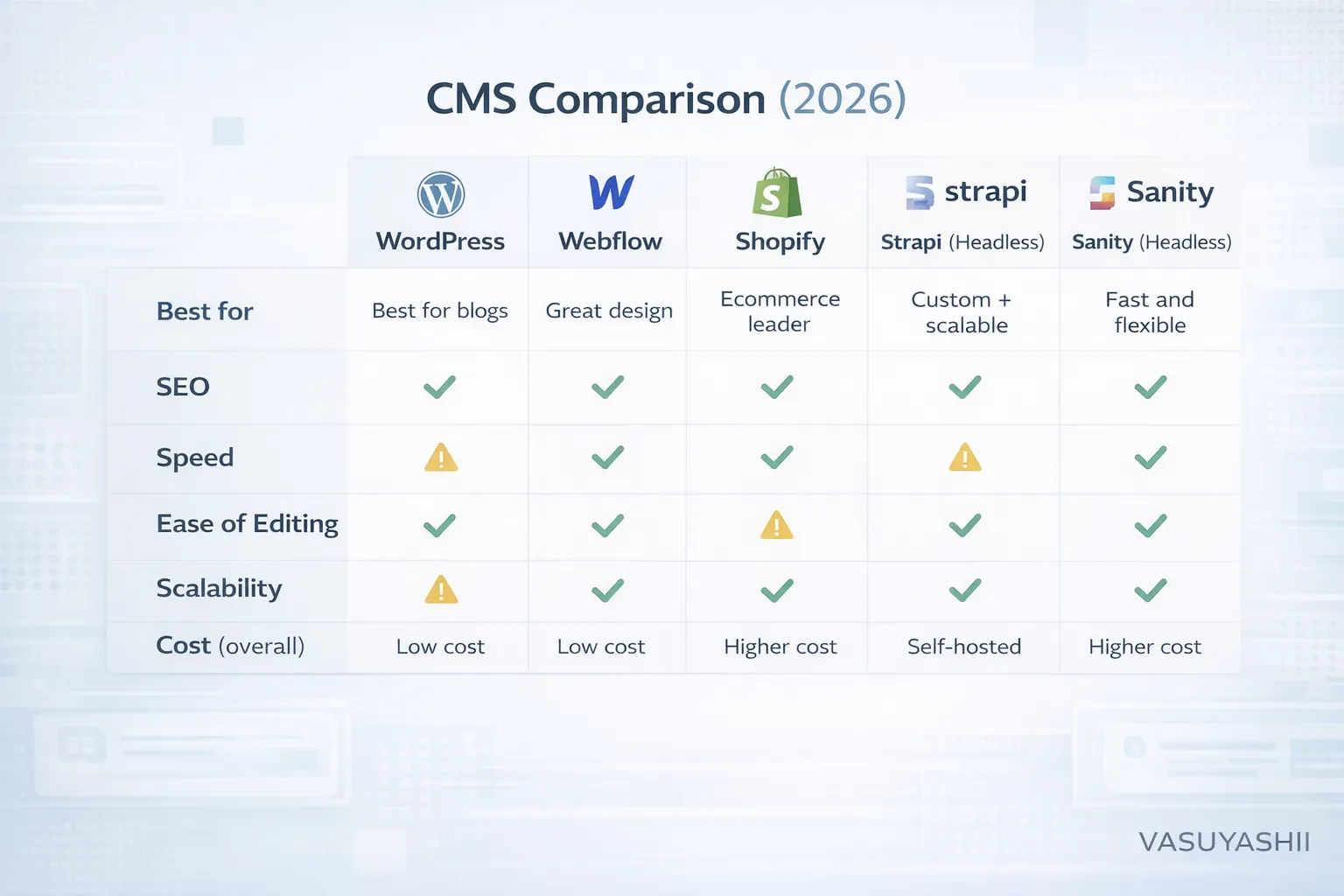
Key comparison factors:
- SEO control
- speed and performance
- content editing ease
- security
- scalability
- cost
Now let’s break down the best CMS platforms one by one.
1) WordPress (Best for Blogging + Most Businesses)
WordPress is the most popular CMS. It powers millions of sites because it’s flexible, cheap to start, and easy to manage.
When WordPress is the best choice
- you want to publish blogs frequently
- you want your team to edit pages easily
- you want quick website launch
- you are okay with basic maintenance updates
WordPress strengths
✅ Best blogging workflow ✅ Lots of SEO plugins (RankMath/Yoast) ✅ Huge theme ecosystem ✅ Easy to hire developers for it ✅ Can handle service sites + blogs well
WordPress risks (important)
⚠️ Security risks if plugins/themes are outdated ⚠️ Speed issues if page builders are heavy ⚠️ Plugin conflicts can break things ⚠️ Too many auto-generated pages can create thin content
WordPress best practices (if you choose it)
- use lightweight theme
- avoid heavy page builders where possible
- limit plugins
- use WebP images
- strong hosting + caching
- proper internal linking and sitemap setup
Verdict: WordPress is best when your priority is daily blogging + easy content editing, and you can maintain it properly.
2) Webflow (Best for Premium Marketing Websites)
Webflow is a visual CMS + hosting platform. It’s popular for premium marketing websites because it gives great control over design without writing full code.
When Webflow is best
- you want a very premium, clean corporate design
- you want a strong marketing site + landing pages
- you don’t want to manage plugins/hosting
- you want your team to edit content visually
Webflow strengths
✅ Premium design control ✅ Hosting is managed (less maintenance) ✅ Good performance by default (usually) ✅ CMS collections for blogs, case studies, services
Webflow limitations
⚠️ Not ideal for complex apps and portals ⚠️ Pricing can increase as content grows ⚠️ Some advanced SEO and technical changes require expertise
Verdict: Webflow is best for corporate websites, agencies, and marketing sites where design quality is the top priority.
3) Shopify (Best CMS for Ecommerce)
If you sell products, Shopify is the best all-in-one platform:
- products
- payments
- inventory
- orders
- shipping
- themes
When Shopify is best
- you sell physical products
- you want stable and secure ecommerce
- you want quick store launch
- you don’t want to build everything custom
Shopify strengths
✅ Very stable, secure ecommerce ✅ Easy product management ✅ Great payment integrations ✅ App ecosystem for ecommerce features
Shopify limitations
⚠️ Monthly cost + app costs ⚠️ Customization limited compared to full custom builds ⚠️ For heavy content SEO, you may still need blog strategy and custom work
Verdict: For ecommerce, Shopify is usually the best CMS choice.
4) Strapi (Best Self-Hosted Headless CMS)
Strapi is a headless CMS that you can host yourself. It’s great when you want a custom Next.js website but still want a CMS panel to edit content.
When Strapi is best
- you have a custom website (Next.js/React)
- you want full content control
- you want to scale later into apps
- you want a self-hosted CMS
Strapi strengths
✅ Full control over content structure ✅ Works beautifully with Next.js ✅ Great for SEO-friendly content models ✅ Can scale beyond blogs (case studies, services, dynamic pages)
Strapi limitations
⚠️ Needs hosting and maintenance ⚠️ Needs developer setup ⚠️ You manage security updates
Verdict: Strapi is ideal for custom business websites and web apps where you want long-term scalability.
5) Sanity (Best Headless CMS for Speed + Flexibility)
Sanity is a modern headless CMS with real-time editing and powerful content modeling. It’s used by many modern startups.
When Sanity is best
- you want modern content workflow
- your site is Next.js/React
- you want flexible content structures
- you want fast editorial experience
Sanity strengths
✅ Modern editing experience ✅ Real-time content updates ✅ Strong content modeling ✅ Great for scaling content + structured data
Sanity limitations
⚠️ Needs dev setup ⚠️ Pricing may scale with usage ⚠️ Requires proper implementation for SEO
Verdict: Sanity is excellent for premium modern websites and SaaS marketing sites.
6) Contentful (Best for Enterprise Content Teams)
Contentful is an enterprise-grade headless CMS. Big companies use it when they have:
- multiple teams
- multi-language sites
- huge content libraries
- complex workflows
When Contentful is best
- corporate enterprise sites
- multi-brand websites
- strong editorial workflow needs
- compliance requirements
Strengths
✅ Enterprise workflows ✅ Good structured content management ✅ Scales for large organizations
Limitations
⚠️ Expensive compared to others ⚠️ Developer setup required ⚠️ Overkill for small businesses
Verdict: Great for large teams, not necessary for most small businesses.
Best CMS Choice by Business Type (Simple)
Service business (leads + blogs)
✅ WordPress OR Next.js + headless CMS (Strapi/Sanity)
Corporate website (premium design + trust)
✅ Webflow OR Next.js + headless CMS
SaaS startup marketing + scale
✅ Next.js + Sanity/Strapi
Ecommerce
✅ Shopify
Portfolio/agency
✅ Webflow OR WordPress
Best CMS for Your SEO Blogging Plan (3–4 blogs/day)
Since your plan is aggressive blogging, you need:
- easy publishing workflow
- clean URLs
- internal linking support
- fast performance
Best options for heavy blogging
1) WordPress (easiest to publish) 2) Next.js + MDX workflow (like your current setup) 3) Next.js + Headless CMS (Sanity/Strapi) (best long-term)
Your current MDX approach is powerful, but you must keep:
- indexing healthy
- internal links strong
- sitemap updated
- avoid duplicate canonicals
CMS Mistakes That Can Hurt SEO
Avoid these:
- auto-generated tag pages with thin content
- duplicate pages and canonicals
- publishing low-value repetitive content
- slow pages due to heavy scripts
- not linking blogs to service pages
A CMS is a tool. SEO depends on how you use it.
Final Recommendation (Simple)
If you want the most practical results:
- If you want easiest blogging + fastest content workflow → WordPress
- If you want premium marketing design without dev headache → Webflow
- If you want ecommerce → Shopify
- If you want scalable custom website + future web apps → Next.js + Strapi or Sanity
If you want a custom website with CMS that is fast and scalable, see: Web Applications Services
Need Help Choosing the Right CMS?
If you tell us:
- your business type
- who will write blogs (you/team)
- how often you will publish
- whether you want web apps later
We can recommend the best CMS stack and build it with proper SEO-ready structure.
👉 WhatsApp: Chat on WhatsApp 👉 Portfolio: View our work 👉 Contact: Contact page