WordPress vs Custom Development (2026): Which One Is Best for Your Business?
If you’re planning to build a new website in 2026, one question will come up immediately: Should we build on WordPress, or go for custom development? Both options can work, but the correct choice depends on your goals, budget, timeline, and long-term plans.
Many businesses start with WordPress because it’s fast and affordable. Many businesses choose custom development because they want premium UI/UX, better speed, stronger SEO foundation, and long-term scalability (dashboards, portals, automation, SaaS).
This guide explains the difference in a practical way—so you don’t waste money or rebuild again later.
Quick Decision (30-second answer)
✅ Choose WordPress if:
- you want a website quickly
- budget is limited
- you want to edit pages/blog yourself without a developer
- the site is mainly informational (Home/About/Services/Contact)
✅ Choose Custom Development if:
- you want premium UI/UX + best speed
- you care about long-term SEO growth (Core Web Vitals)
- you want advanced features later (portal, dashboard, automation, SaaS)
- you want stability without plugin conflicts
If your goal is a high-performance website or web app, explore: Web Applications Services
What is WordPress?
WordPress is a CMS (Content Management System) where you build websites using:
- themes
- plugins
- page builders (Elementor, WPBakery, etc.)
It’s popular because a non-technical team can:
- update pages
- publish blogs
- manage content easily
WordPress can be a great starting point—if built properly.
What is Custom Development?
Custom development usually means a website built using modern frameworks like:
- Next.js + React (frontend)
- Firebase/Node (backend if needed)
- Tailwind CSS (UI)
- Vercel/CDN hosting (performance)
Custom doesn’t mean complicated. It means:
- clean code
- premium look
- better speed
- stronger control over SEO structure
- easy scalability for future features
Visual Comparison (Quick table)
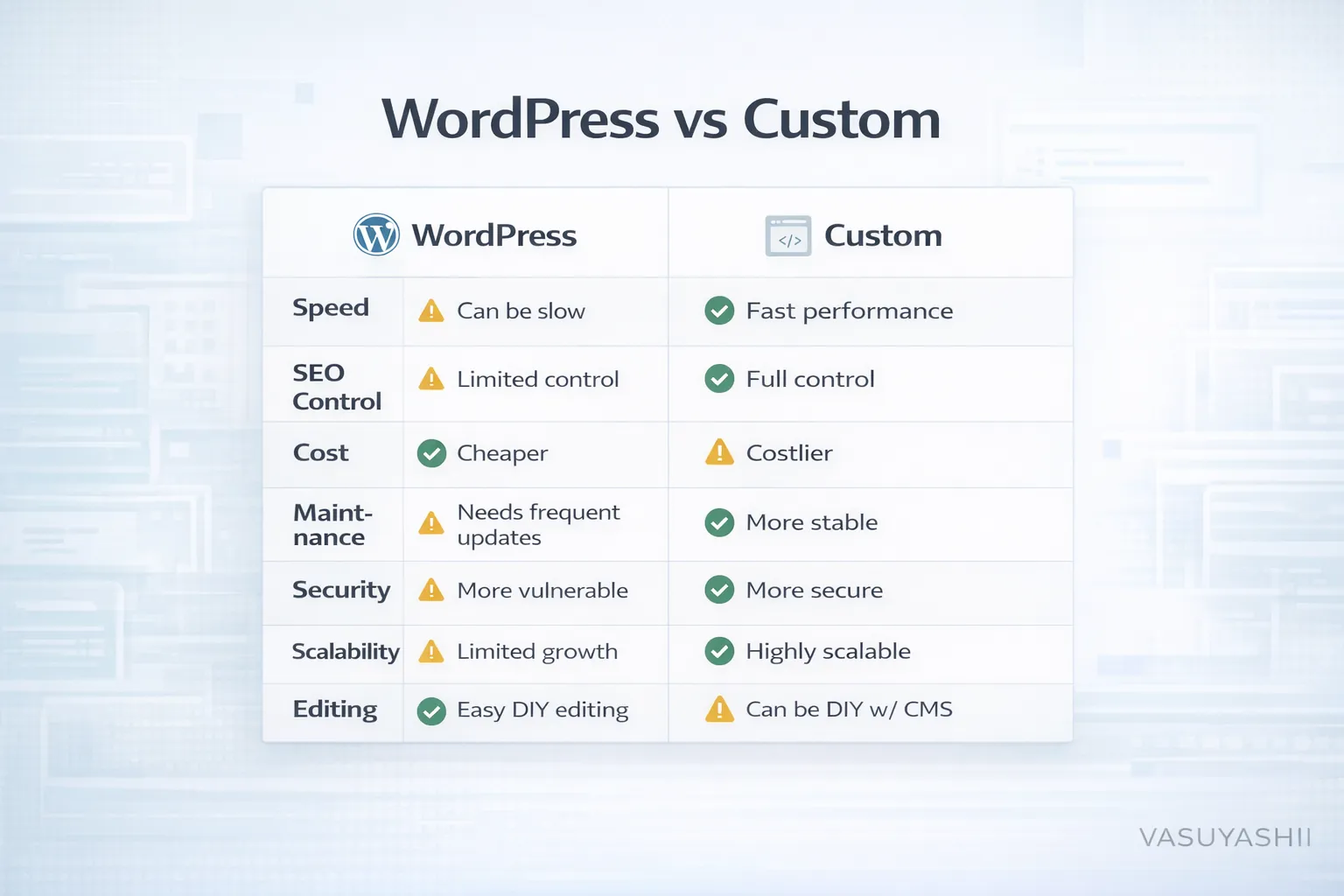
1) Speed & Performance (Biggest difference in 2026)
Speed matters because:
- users leave slow websites quickly
- fast websites convert better
- Google prefers fast pages (Core Web Vitals)
WordPress speed reality
WordPress speed depends on:
- theme quality
- plugin count
- page builder weight
- hosting quality
Many WordPress sites become slow because:
- too many plugins
- heavy page builders
- unoptimized images
Custom website speed reality
Custom Next.js websites can be extremely fast because:
- less unnecessary code
- better caching + CDN
- modern image optimization
- clean HTML output
If SEO + lead generation is serious, performance becomes a major advantage for custom development.
2) SEO (Ranking on Google)
Both WordPress and custom websites can rank—but the approach differs.
WordPress SEO pros
- easy blogging
- plugins like RankMath / Yoast
- quick sitemap support
WordPress SEO risks
- messy HTML output from builders
- duplicate tag/category pages can create thin content
- slow pages reduce rankings
Custom SEO pros
- clean headings (H1/H2/H3)
- fast load speed
- better control over schema, metadata, internal linking
- better technical SEO structure
Custom SEO consideration
- you need a proper blog setup (MDX/CMS)
- content updates require a workflow (like your current MDX setup)
If you’re doing heavy blogging, also read:
3) Cost Comparison in India (2026)
Cost depends on quality and scope, but typical ranges:
WordPress
- Basic business WP website: ₹20,000 – ₹80,000
- Premium WP + custom design: ₹80,000 – ₹2,00,000
- WP + ecommerce (WooCommerce): ₹60,000 – ₹3,50,000
Custom Development
- Custom business website: ₹60,000 – ₹2,50,000
- Custom + CMS + premium UI: ₹1,50,000 – ₹4,00,000
- Custom portal/dashboard: ₹1,50,000 – ₹10,00,000+
For deeper pricing, read: Cost of Website Development in India (2026)
4) Maintenance & Stability
WordPress maintenance
WordPress needs regular:
- plugin updates
- theme updates
- security patches
- backups
Many WordPress sites break due to:
- plugin conflicts
- outdated plugins
- hacked admin panels
Custom website maintenance
Custom sites usually need:
- code updates occasionally
- dependency updates
- hosting renewal
But they’re more stable because:
- fewer moving parts
- no plugin conflicts
5) Security
WordPress risks
- wp-admin attacks
- vulnerable plugins
- outdated themes
WordPress can be secure, but needs good practices.
Custom security
Custom sites often have smaller attack surface because:
- no default wp-admin
- fewer plugin vulnerabilities
If you want security best practices: Website Security Best Practices
6) Editing Content: Which is easier?
WordPress wins
If you want:
- your team to update pages
- publish blogs quickly
WordPress is easiest.
Custom can also be editable
Custom websites can become easy to edit by adding a CMS (Strapi/Sanity) or using MDX workflow (like your current site).
7) Scalability: Can it become bigger later?
WordPress scalability
Great for:
- informational sites
- landing pages
- blogs
Not great for:
- dashboards/portals
- automation systems
- complex reporting
Custom scalability
Custom sites can evolve into:
- web applications
- admin panels
- portals
- SaaS products
If your plan is future web apps, custom is the right foundation.
Best Hybrid Option (Most businesses should do this)
In 2026, many businesses choose:
✅ Custom website + CMS
- premium UI/UX
- fast performance
- easy editing like WordPress
- scalable for future features
If you want this setup, check: Web Applications Services
What We Recommend for Delhi / Noida / Ghaziabad
If you want leads in Delhi NCR, your website must have:
- fast mobile performance
- WhatsApp CTA
- proof (portfolio + demos)
- SEO-ready structure
Useful pages:
Final Recommendation (Simple)
- Want fast launch + easy editing → WordPress
- Want premium + speed + scale into apps → Custom
- Want both (best option) → Custom + CMS
Need Help Choosing?
If you tell us your business type and goals, we can recommend the best option and give you a clear roadmap.
👉 WhatsApp: Chat on WhatsApp 👉 Services: Web Applications Services 👉 Portfolio: View our work 👉 Contact: Contact page