Order Management System (OMS) Development Guide: Features, Cost, and Rollout Plan for SMBs (2026)
Many businesses outgrow manual order tracking before they realize it. Orders come from website forms, WhatsApp, sales calls, distributors, or repeat customers, but status is managed through spreadsheets, chat, and memory. That works until dispatch gets delayed, payment status becomes unclear, or customer communication starts breaking down.
An order management system is the layer that brings order capture, status flow, stock coordination, dispatch updates, and reporting into one operational view. For Indian SMBs, the best OMS is not an enterprise monster. It is a practical system that shows where each order stands and what needs to happen next.
This guide explains what a lean OMS should include, how much development usually costs in India, which tech stack works well, and how to scope phase one without creating unnecessary bloat.
Table of Contents
- Quick answer
- Why businesses need OMS
- What the system should control
- Features
- Pricing in India
- Tech stack
- Timeline
- Cost drivers
- FAQs
Quick Answer
If your team struggles to answer "What is the latest status of this order?" quickly and confidently, you probably need an OMS. The right system should centralize order details, payment state, fulfilment steps, dispatch readiness, and customer-facing status updates in one place.
A useful SMB OMS usually covers:
- order creation and source tracking
- status workflow from confirmation to dispatch
- payment and invoice visibility
- stock or warehouse coordination
- returns or exception handling
- reports for pending and completed orders
If dispatch and physical movement are major pain points, this topic connects closely with warehouse management systems and billing software.
Best Fit Scenarios
OMS is a strong fit for B2B sellers, distributors, ecommerce-support teams, project supply businesses, and any SMB where orders move through multiple internal checkpoints before completion. If the sales team, warehouse team, and billing team are constantly checking status manually, OMS usually creates fast value. It is also highly relevant when customers expect quick updates but your team still depends on repeated internal calls to confirm readiness, payment state, or dispatch progress.
Businesses also benefit early when order volume is increasing but the internal team still has no clean daily view of overdue, blocked, or exception orders. That visibility alone can reduce customer frustration and internal follow-up time.
This matters a lot for businesses scaling from a manageable order count to a much higher daily load. Without an OMS, the usual response is to add more coordination calls and more follow-up people instead of fixing the flow itself. A good OMS lets the same team handle more volume with better clarity and cleaner handover.
That is usually where the ROI becomes obvious.
Small teams feel that improvement very quickly.
Why Businesses Need OMS
Orders sit at the intersection of sales, stock, billing, customer communication, and dispatch. When those parts are disconnected, order handling becomes fragile.
Common order-management pain points
- Orders come from multiple channels: website, sales team, WhatsApp, and repeat customers all flow into different places.
- Status updates are manual: teams keep checking with each other instead of checking a system.
- Payment and dispatch are disconnected: one team thinks the order is ready, another sees pending payment or pending stock.
- Customer communication is inconsistent: customers ask for updates and staff still need to make internal calls first.
- Returns and issues are not structured: exceptions stay in chat threads, not in a traceable order record.
- Owner reporting is weak: there is no clean view of open orders, fulfilled orders, pending payment, or delayed dispatch.
What a good OMS changes
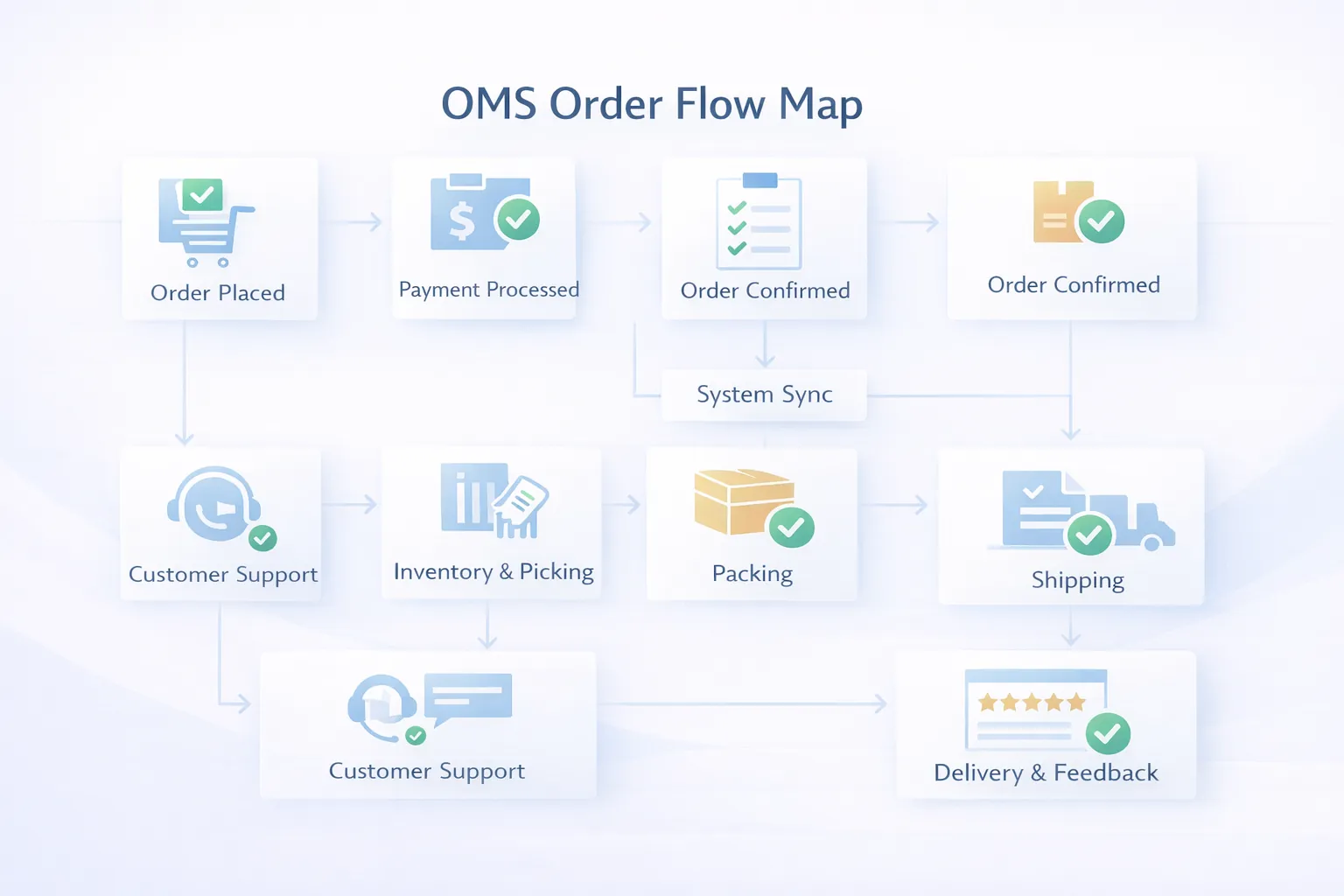
Good OMS design gives operational clarity. It makes the order lifecycle visible from the first confirmation to the last dispatch update. That reduces internal coordination effort, improves customer response time, and gives management a more accurate picture of fulfilment performance.
What the System Should Control
Before building an OMS, define the exact order lifecycle.
Source and confirmation
The software should know where the order came from and what confirms it. That may be manual approval, payment receipt, customer PO, or sales confirmation.
Fulfilment readiness
The system should show whether stock is ready, whether packing has started, or whether procurement or production is still pending. This prevents the team from treating all confirmed orders as equally ready.
Dispatch and completion
Dispatch should not be a vague final step. There should be a visible handoff from packed to dispatched to delivered or closed, with exception notes where needed.
Returns and after-order events
Not every order ends neatly. Returns, damage, short shipment, or replacement requests should remain linked to the original order record so the team does not lose context.
For businesses selling across multiple channels or fast-moving dispatch, OMS often becomes the backbone that connects sales, warehouse, and billing.
Features
These features usually matter most in an SMB-friendly OMS.
- Order capture and source tagging: create or import orders from web, sales, chat, marketplace, or manual entry sources.
- Customer and order master: every order should carry customer details, line items, dates, payment notes, and fulfilment context.
- Status workflow: clear stages like new, confirmed, payment pending, ready to pack, packed, dispatched, delivered, returned, or cancelled.
- Stock and fulfilment visibility: show whether fulfilment is blocked by stock, procurement, warehouse work, or billing.
- Payment status tracking: unpaid, partial, paid, COD, or verification pending should be obvious.
- Packing and dispatch handoff: operations teams need a structured move from order to dispatch, not informal coordination.
- Returns and issue tracking: short shipment, damaged item, replacement, and refund status should stay traceable.
- Customer communication support: send order update messages or keep response context inside the order record.
- Role-based views: sales, warehouse, finance, support, and owner dashboards should reflect their specific work.
- Reports and dashboards: pending orders, delayed dispatch, source-wise volume, payment-pending orders, and fulfilment turnaround matter.
- Audit log: order edits, reassignment, status changes, and exception updates should remain visible.
- Integration points: billing, warehouse, CRM, and courier or shipping hooks can be added as needed.
Useful phase-two additions
Businesses often add automated notifications, channel sync, courier APIs, RTO views, SLA tracking, or customer self-service after the core order flow becomes stable.
Soft CTA
If your team is still asking three people to know one order status, a proper OMS usually pays for itself in saved time and fewer fulfilment mistakes.
Pricing in India
OMS pricing depends on order volume, dispatch workflow, stock linkage, and integration requirements.
Typical custom pricing
- Starter OMS:
₹1.8 lakh to ₹3 lakh
Includes order records, status flow, dashboards, and basic fulfilment visibility.
- Growth OMS:
₹3.2 lakh to ₹5.5 lakh
Includes payment state, packing and dispatch handoff, returns tracking, and role-based dashboards.
- Advanced SMB OMS:
₹5.75 lakh to ₹9 lakh
Includes channel sync, warehouse integration, customer notifications, and deeper reporting.
Best ROI range
For many SMBs, the most effective scope sits in the ₹3.2 lakh to ₹5.5 lakh band because it brings real operational clarity without becoming an oversized platform.
Where scope gets expensive
Costs rise when the OMS is expected to replace inventory, WMS, shipping, finance, and CRM completely in phase one. That is rarely the best first move.
Tech Stack
An OMS needs good status integrity, fast filters, and clean integrations.
- Frontend:
Next.js for order tables, status boards, detail pages, and responsive role-based dashboards. - Backend:
Node.js for order workflow, validation, status transitions, and notification logic. - Database:
PostgreSQL for order master, line items, payments, dispatch records, and activity logs. - Auth and roles: separate permission views for sales, warehouse, finance, support, and management.
- Notification layer: email, WhatsApp, or SMS triggers for approved order updates where required.
- Hosting: managed cloud infrastructure with backups and staging environment.
- Logging and audit: strong visibility into who changed order state and why.
- Integration readiness: APIs for billing, WMS, CRM, payments, and shipping services when needed.
If order updates depend on payment or messaging tools, API integration services becomes important early.
Timeline
OMS projects usually take 5 to 9 weeks for an SMB-ready launch.
- Week 1: map order sources, lifecycle stages, and approval logic.
- Week 2: define data structure, status rules, and role views.
- Week 3 to 4: build order creation, status flow, and order detail views.
- Week 5: add dashboards, payment visibility, and fulfilment handoff logic.
- Week 6: test delayed, cancelled, returned, and partially fulfilled orders.
- Week 7: train users and launch phase one.
- Week 8 to 9: add notifications, integrations, or dispatch refinements if required.
Timelines stretch when the business does not yet agree on what counts as confirmed, ready, dispatched, or closed. These status definitions should be finalized early.
Cost Drivers
These are the biggest budget variables in OMS development:
- Number of order sources: one source is simpler than multi-channel order capture.
- Status complexity: more branches, payment states, and exception states mean more logic.
- Warehouse linkage: packing and dispatch coordination adds operational depth.
- Payment visibility: syncing or tracking payment state increases structure.
- Return handling: reverse flow usually needs extra screens and reporting.
- Role count: more departments involved means more views and permissions.
- Notification automation: useful, but it should follow stable workflow logic.
- Integration scope: billing, WMS, CRM, and courier APIs all expand the project.
The right OMS should reduce uncertainty. If order status still needs manual confirmation every time, the workflow design is incomplete.
Implementation Tips for Phase One
To keep rollout practical:
- finalize one order status vocabulary the whole team will use
- define which team owns each stage transition
- separate payment status from fulfilment status
- plan exception states like cancelled, short, or returned early
- delay advanced channel sync until the manual core flow is working well
That sequence gives cleaner adoption and better reporting. Once the team trusts the status flow, you can expand into automation, courier sync, or customer portal features.
Common Mistakes to Avoid
Mixing payment state and fulfilment state
An order can be paid but not packed, or packed but payment-pending in some models. If the system mixes those concepts, reporting becomes confusing.
No exception workflow
Returns, partial fulfilment, customer hold, and stock shortage are normal. If phase one ignores them completely, teams go back to chat and side spreadsheets.
Over-automating too early
Automation is useful, but only after the team agrees on manual flow first. Otherwise, the wrong status changes get automated and create new confusion.
Weak role separation
Sales, finance, support, and warehouse teams use the same order differently. A one-screen-fits-all approach usually slows everyone down.
Building OMS without stock or dispatch context
If the software stores orders but cannot show fulfilment readiness, it becomes an incomplete record system rather than an operational tool.
FAQs
What is an order management system?
It is software that manages order capture, status flow, payment visibility, fulfilment, dispatch, and related reporting in one place.
How much does OMS development cost in India?
For SMB-focused builds, it usually starts around ₹1.8 lakh and often lands between ₹3.2 lakh and ₹5.5 lakh for a practical system.
Is OMS the same as ecommerce software?
No. Ecommerce software is customer-facing storefront logic. OMS is the internal operational layer for processing and tracking orders.
Can OMS connect with warehouse software?
Yes. In fact, that is one of the most valuable integrations when dispatch is a daily operational pain point.
How long does it take to build?
Most SMB OMS projects take around 5 to 9 weeks depending on exception handling and integration needs.
Should OMS include returns from day one?
Usually yes in at least a basic form, because returns and cancellations are common realities that affect reporting.
Can OMS send customer updates?
Yes. Many businesses add approved WhatsApp or email updates once the status flow is stable.
What is the biggest mistake in OMS projects?
Not agreeing on status meanings before development starts. Most confusion later traces back to that.
Related Reading
Need Better Order Visibility Without Manual Follow-Up?
If your team still checks order status through repeated calls, chat pings, and Excel filters, the process is ready for a proper OMS.